
Microsoft
Program for organizations that need multiple Microsoft product licenses.
Timely Service Delivery & Incident Resolutions!!
Including operating systems for personal computers ("PCs"), servers, phones, and other intelligent devices; productivity applications; business solution applications; desktop and server management tools.

Microsoft Volume Licensing is a term used by Microsoft to describe a program for organizations that need multiple Microsoft product licenses, but do not need multiple copies of the software media and the documentation that comes with the software.
Microsoft Volume Licensing typically offers organizations lower pricing, two or three-year license agreements and often product use rights not included with FPP (Full Packaged Product) licenses, such as right to copy the software onto multiple devices.
Microsoft intelligent business applications are the enabler of Digital Transformation. They provide the means for organizations to grow, evolve and meet the changing needs of customers, as well as capture new business opportunities.
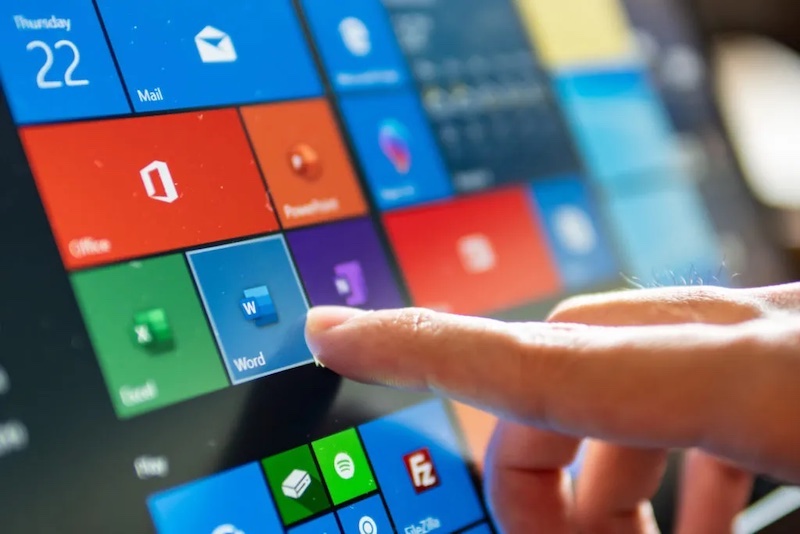
Get the worldwide standard for desktop apps like Word, Excel, PowerPoint, and more. Create, view, and edit in real time across all your devices with desktop and mobile apps for Windows PCs, iOS, Android, and Mac.

Microsoft Office 365 Volume Licensing
Microsoft Office suites help enable enterprise productivity across devices. For Volume Licensing customers, Microsoft Office delivers new ways of collaborating, making it easier to support flexible work styles. Office 365 gives users access to the productivity solutions from anywhere, provides simple management IT solutions, and comes with a contract backed Service Level Agreement.
Office 365 is Microsoft’s most complete, secure suite of cloud productivity services designed for the cloud. It's sold as suites available for every organization irrespective of their size. Some suites include Office 365 Pro Plus, which delivers the full downloadable Office client along with set of web-based applications (including Word, Excel, and PowerPoint), business-class email, file sharing, meetings and communications solutions, and an internal collaboration social network. Each suite helps keep your data private and protected from potential threats by focusing on security needs at every level.
Always available
Have peace of mind knowing your services are available with a guaranteed 99.9 percent uptime, contract backed SLA.
Security built in
Assist in keeping your customers' data safe with help from cutting-edge, multi-layer security and proactive monitoring.
Easy to set up
REDEXPER helps you deploy and manage Microsoft 365 across your company, no need for an in-house IT personnel.
Premium support
Rely on REDEXPER for answers with a call or chat, how-to resources, and connections for setup and quick fixes.
Microsoft 365 for Enterprise helps people and teams do their best work with the apps and experiences they rely on every day to connect, collaborate, and get work done from anywhere.
Microsoft
Frequently asked questions
The Office Online Server is included when you purchase Office Professional Plus 2019 or Office Standard 2019 licenses. It allows you to host the Office Online Server on premises, and you can also access it with a Microsoft 365 Apps for enterprise license.
External users accessing Office Web Apps documents for viewing or editing aren't required to license Office suites. External users are users who aren't either your or your affiliates’ employees, on-site contractors, or on-site agents.
Yes. Downgrade Rights in Volume Licensing programs give you the right to use any prior version of the same product. For example, if you're licensed for Microsoft Office Professional Plus 2019 through Volume Licensing, you can use Microsoft Office Professional Plus 2016 instead. But you may not downgrade to Microsoft Office Standard Edition 2016 because it is a different product and not considered a prior version of Microsoft Office Professional Plus 2019.
Microsoft offers a number of licensing solutions that help you move to the cloud. Customers with Software Assurance can choose to replace their current Office 2019 solution with the Microsoft 365 Apps for enterprise From SA offer or they can add Microsoft 365 Apps for enterprise to their current Office 2019 solution with a Microsoft 365 for enterprise Add-on. Both the From SA and Add-on options recognize your existing investment in Office with unique price points.
Yes. You may use Office 2019 for Mac Standard in place of Office 2019 Standard. Concurrent use isn't allowed, so you may only have one of these versions installed and in use at a time.
The free Office apps are available for personal use only. Business users require commercial use rights, which are available only with an Office 365 or Microsoft 365 commercial subscription. The premium features included with a qualifying commercial subscription include full editing rights, the ability to install on multiple devices, business cloud-storage portals like OneDrive for Business and SharePoint, and other enterprise-grade features.
Mobile apps on devices with displays that are larger than 10.1 inches will be view-only for everyone except subscribers with a qualifying Office 365 or Microsoft 365 plan. Eligible Office 365 and Microsoft 365 users will be able to sign in to the Office mobile apps and unlock the paid features.
A detailed payment plan wil be shared with the you following the quotation of the job. Our advisors will then walk you through the available payment methods whether its local or foreign.

Need Our Help? You Are More Than Welcome To Visit Us Or Give Us A Call
REDEXPER has been helping organizations and Providers through South East Asia manage their IT with our unique approach to technology management and consultancy solutions.
Kuala Lumpur Office
- L21-06, PJX HM Shah Tower, 16 A, Jalan Persiaran Barat, Pjs 52, 46200, Petaling Jaya, Selangor Darul Ehsan, Malaysia
- Phone: +603 7931 6320
- Mobile: +6012 648 2701
- Hours: Mon-Fri: 8am – 7pm
Singapore Office
- 22 Sin Ming Lane, #06-76 Midview City, Singapore 573969,
Singapore - Phone: +6589222041
- Hours: Mon-Fri: 8am – 7pm